Post by : Anis
Al-Rashid
Why Expensive Gear Is No Longer Essential for Stunning Photos
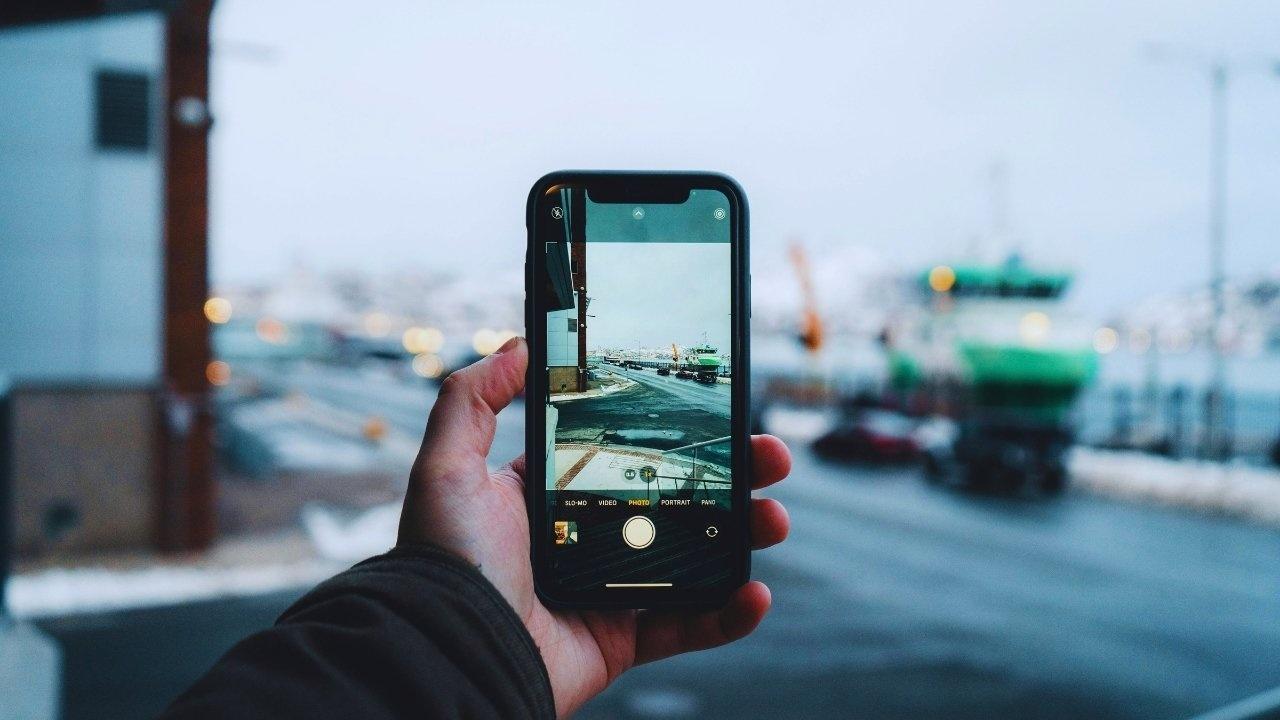
In the past, high-quality photography was synonymous with cumbersome equipment and extensive setups. Traditional pros relied on tripods, DSLRs, and an array of lenses to achieve great shots. However, smartphone cameras now boast remarkable features that often surpass those mid-range cameras, thanks to advancements like computational photography and AI enhancements.
Yet, many users feel their photos lack the professional sheen they witness online. The solution lies not in expensive gear but in effective techniques. With simple habits and an awareness of your device's capabilities, anyone can create stunning images.
This guide will unveil the techniques that empower you to replicate the quality of high-end equipment using only your smartphone.
Harnessing Your Smartphone's Capabilities
Modern smartphones come packed with features once reserved for standalone cameras.
Noteworthy strengths of contemporary smartphone photography include:
• Advanced computational sharpening
• Built-in stabilization technologies
• Automatic HDR functionality
• Intelligent scene recognition
• Effective portrait mode depth mapping
• Night mode with multi-frame processing
• Integrated color enhancements
Understanding these features unlocks tremendous potential for your photography.
Understanding Lighting: The Key to Great Shots
Natural light is more significant than the finest lens.
Natural lighting tips to replace studio lights:
1. Opt for soft morning or evening light
This “golden hour” creates a warm, inviting glow.
2. Use window illumination for indoor portraits
Position yourself near a window for a soft, professional effect.
3. Steer clear of harsh overhead lighting
Instead, seek out walls or windows for softer illumination.
4. Utilize reflective surfaces nearby
White walls, linens, and floors help bounce light naturally.
5. Employ the phone’s Night mode over low-light lenses
Night mode stacks multiple exposures, mimicking broad-aperture capabilities.
Leveraging natural light can often surpass expensive studio interactions.
Stabilization Techniques Beyond Tripods
Your phone will capture sharper images when stable. Fortunately, you don’t always need a tripod.
Consider these alternatives:
• Support your elbows on a flat surface
• Grip the phone with both hands
• Lean against a solid surface
• Set your phone on stable objects
• Use your knee for support if sitting
Pro tip:
Press the volume button to take photos, reducing chances of shake.
Composition: The True Art of Professional Photography
Smart composition is more important than top-notch gear.
1. Utilize the Rule of Thirds
Activate grid lines to place important subjects at intersection points.
2. Implement Leading Lines
Draw viewers' eyes using natural features like paths or railings.
3. Frame Your Shots
Use elements like windows or doorways to encase your subject.
4. Embrace Minimalism
Remove distractions for a more impactful focal subject.
5. Explore Symmetry
Smartphones excel at capturing symmetrical designs; harness this in architecture and portraits.
Expertly Handling Focus and Exposure
Control over focus and exposure comes easily with smartphones.
Try this method:
• Tap your subject to lock focus
• Adjust exposure by sliding your finger up or down
• Reframe while maintaining focus
This replaces expensive manual controls while ensuring clarity in your shots.
Background Management: Achieving Clean Shots Without Gear
While professionals often use wide apertures to blur backgrounds, you can achieve this with smart positioning.
Tips for creating depth without added equipment:
• Bring your subject closer to the camera
• Position backgrounds further away
• Use portrait mode judiciously
• Opt for cleaner backgrounds like walls or clear skies
Even entry-level phones can generate depth through effective distance management.
Angles and Perspectives: Your Secrets to Unique Photos
Great angles can turn a mundane shot into something remarkable.
Try experimenting with:
• Low-angle shots for dramatic flair
• Overhead for food photography
• Diagonal compositions for interest
• Side perspectives for portraits
• Backlighting for creative silhouettes
Avoid Digital Zoom for Quality Shots
Digital zoom frequently degrades image quality.
Instead of zooming digitally, try:
• Moving closer to your subject
• Cropping images post-capture
• Using 2x or 3x zoom only when available
Editing on Your Phone: A Budget-Compatible Alternative
While professional photos may need desktop edits, smartphones have powerful editing features built-in.
Most beneficial adjustments include:
• Brightness
• Shadows
• Highlights
• Contrast
• Vibrance
• Color temperature
• Clarity
Maximize Burst Mode for Dynamic Subjects
For capturing action, burst mode is invaluable.
Benefits of burst mode:
• Capture the best moment
• Maintain sharpness during motion
• Reduce unknowns that lead to blurry shots
Portrait Mode: A Cost-Free Option for Depth
Simulate a professional depth of field with portrait mode.
For best results:
• Ensure adequate space behind your subject
• Aim for good lighting
• Keep backgrounds uncluttered
• Maintain a proper distance
• Experiment with various angles
Night Photography: Techniques to Shine in Low Light
Older cameras struggled in dim settings, but modern phones excel with stacking techniques.
For impressive night shots:
• Steady your phone for optimal exposure
• Lock focus before taking the picture
• Utilize nearby lighting sources
• Refrain from digital zoom
• Underexpose slightly for better clarity
Home Remedies for Studio Lighting
Everyday items can mimic professional lighting setups quite effectively.
Consider these hacks:
• White bedsheets as diffusers
• Table lamps as soft directional lights
• Foil for reflection
• Curtains to diffuse harsh light
• Your phone screen can act as a fill light
Using Reflections and Mirrors for Creative Photos
Professional-quality shots often utilize reflective surfaces.
Common reflective materials:
• Mirrors
• Water puddles
• Glass windows
• Shiny floors
• Vehicle windows
Shadow Play: Capturing Patterns without Gear
Shadows can amplify the aesthetic of your images.
Draw inspiration from:
• Window blinds
• Leaves on trees
• Railings
• Fences
• Curtains
Using HDR Without Extra Equipment
HDR facilitates blending exposures for balanced photos.
Best scenarios for HDR:
• Landscapes
• Bright skies
• Backlit subjects
• High contrast situations
Tweaking Manual Settings for Maximum Control
Organizations sometimes offer Pro modes to enhance control over your shots.
Utilize these features:
• ISO control
• Shutter speed adjustments
• White balance tweaking
• Focus selection
• Exposure settings
Transforming Movement into Cinematic Shots
Effects like slow motion and long exposure create unique visuals.
Use long exposure for:
• Waterfalls
• Traffic trails
• Light painting effects
Employ slow motion for:
• Sports highlights
• Water effects
• Action moments
Habits to Instantly Improve Your Smartphone Photography
1. Clean your lens
Fingerprints can heavily distort image quality.
2. Activate grid lines
This technique significantly enhances composition.
3. Stabilize your phone
Utilizing body support or stabilizing surfaces will maximize sharpness.
4. Disable beauty filters
Overuse can compromise natural facial features.
5. Snap multiple images
This provides you with choices for the best shot.
Timely Tips for Self-Portraits
For solo captures without assistance, try:
Use:
• Timer settings
• Bluetooth devices as remote triggers
• The burst function
• Stable surfaces for support
Achieving Beautiful Portraits with Basic Techniques
Key principles for exquisite portraits:
• Prioritize the eyes as focal points
• Backgrounds should be uncluttered
• Favor soft lighting
• Avoid harsh shadows
• Pick flattering angles
• Leave some headroom
• Maintain distance from busy scenes
Conclusion
Smartphone camera capabilities have exceeded expectations, but capturing remarkable images relies on technique rather than equipment price. By leveraging natural light, practicing stabilization, strategically selecting backgrounds, and editing wisely, stunning photos can be captured without the need for expensive gear.
Photography has transitioned from heavy reliance on hardware to a focus on skill. By mastering these essential habits, your phone will become a powerful photography instrument, capable of artistic outputs anytime, anywhere.
Disclaimer:
This guide provides general photography advice. Users should adapt techniques based on their specific devices and conditions.


 English